How to set up an analysis#
H2Integrate is designed so that you can run a basic analysis or design problem without extensive Python experience. The key inputs for the analysis are the configuration files, which are in YAML format. This doc page will walk you through the steps to set up a basic analysis, focusing on the different types of configuration files and how use them.
Top-level config file#
The top-level config file is the main entry point for H2Integrate. Its main purpose is to define the analysis type and the configuration files for the different components of the analysis. Here is an example of a top-level config file:
1name: "H2Integrate Config"
2
3system_summary: "This reference hybrid plant..."
4
5driver_config: "driver_config.yaml"
6technology_config: "tech_config.yaml"
7plant_config: "plant_config.yaml"
The top-level config file contains the following keys:
name: (optional) A name for the analysis. This is used to identify the analysis in the output files.system_summary: (optional) A summary of the analysis. This helpful for quickly describing the analysis for documentation purposes.driver_config: The path to the driver config file. This file defines the analysis type and the optimization settings.technology_config: The path to the technology config file. This file defines the technologies included in the analysis, their modeling parameters, and the performance, cost, and financial models used for each technology.plant_config: The path to the plant config file. This file defines the system configuration and how the technologies are connected together.
The goal of the organization of the top-level config file is that it is easy to swap out different configurations for the analysis without having to change the code.
For example, if you had different optimization problems, you could have different driver config files for each optimization problem and just change the driver_config key in the top-level config file to point to the new file.
This allows you to quickly test different configurations and see how they affect the results.
Note
The filepaths for the plant_config, tech_config, and driver_config files specified in the top-level config file can be specified as either:
Filepaths relative to the top-level config file; this is done in most examples
Filepaths relative to the current working directory; this is also done in most examples, which are intended to be run from the folder they’re in.
Filepaths relative to the H2Integrate root directory; this works best for unique filenames.
Absolute filepaths.
More information about file handling in H2I can be found here
Driver config file#
The driver config file defines the analysis type and the optimization settings. If you are running a basic analysis and not an optimization, the driver config file is quite straightforward and might look like this:
 1name: "driver_config"
 2description: "This analysis runs a wind plant hooked up to an electrolyzer and simple tank"
 3
 4general:
 5  folder_output: wind_electrolyzer
 6
 7recorder:
 8  # required inputs
 9  flag: True #record outputs
10  file: "cases.sql" #this file will be written to the folder `wind_electrolyzer`
11
12  # optional but recommended inputs
13  overwrite_recorder: True #If True, do not create a unique recorder file for subsequent runs. Defaults to False.
14  recorder_attachment: "model" #"driver" or "model", defaults to "model". Use "driver" if running a parallel simulation.
15  includes: ["*"] #include everything
16  excludes: ["*wind_resource*"] #exclude wind resource data
17
18  # below are optional and defaulted to the OpenMDAO default
19  # record_inputs: True #defaults to True
20  # record_outputs: True #defaults to True
21  # record_residuals: True #defaults to True
22  # options_excludes: #this is only used if recorder_attachment is "model"
If you are running an optimization, the driver config file will contain additional keys to define the optimization settings, including design variables, constraints, and objective functions. Further details of more complex instances of the driver config file can be found in more advanced examples as they are developed.
Technology config file#
The technology config file defines the technologies included in the analysis, their modeling parameters, and the performance, cost, and financial models used for each technology.
The yaml file is organized into sections for each technology included in the analysis under the technologies heading.
Here is an example of a technology config that is defining an energy system with wind and electrolyzer technologies:
 1name: "technology_config"
 2description: "This plant has wind feeding into an electrolyzer without optimization"
 3
 4technologies:
 5  wind:
 6    performance_model:
 7      model: "PYSAMWindPlantPerformanceModel"
 8    cost_model:
 9      model: "ATBWindPlantCostModel"
10    model_inputs:
11      performance_parameters:
12        num_turbines: 100
13        turbine_rating_kw: 8300
14        rotor_diameter: 196.
15        hub_height: 130.
16        create_model_from: "default"
17        config_name: "WindPowerSingleOwner"
18        pysam_options: !include "pysam_options_8.3MW.yaml"
19        run_recalculate_power_curve: False
20        layout:
21          layout_mode: "basicgrid"
22          layout_options:
23            row_D_spacing: 10.0
24            turbine_D_spacing: 10.0
25            rotation_angle_deg: 0.0
26            row_phase_offset: 0.0
27            layout_shape: "square"
28      cost_parameters:
29        capex_per_kW: 1500.0
30        opex_per_kW_per_year: 45
31        cost_year: 2019
32  electrolyzer:
33    performance_model:
34      model: "ECOElectrolyzerPerformanceModel"
35    cost_model:
36      model: "SingliticoCostModel"
37    model_inputs:
38      shared_parameters:
39        location: "onshore"
40        electrolyzer_capex: 1295 # $/kW overnight installed capital costs for a 1 MW system in 2022
41
42      performance_parameters:
43        size_mode: "normal"
44        n_clusters: 13 #should be 12.5 to get 500 MW
45        cluster_rating_MW: 40
46        eol_eff_percent_loss: 13 #eol defined as x% change in efficiency from bol
47        uptime_hours_until_eol: 80000. #number of 'on' hours until electrolyzer reaches eol
48        include_degradation_penalty: True #include degradation
49        turndown_ratio: 0.1 #turndown_ratio = minimum_cluster_power/cluster_rating_MW
50      financial_parameters:
51        capital_items:
52          depr_period: 7 # based on PEM Electrolysis H2A Production Case Study Documentation estimate of 7 years. also see https://www.irs.gov/publications/p946#en_US_2020_publink1000107507
53          replacement_cost_percent: 0.15 # percent of capex - H2A default case
Here, we have defined a wind plant using the pysam_wind_plant_performance and atb_wind_cost models, and an electrolyzer using the eco_pem_electrolyzer_performance and singlitico_electrolyzer_cost models.
The performance_model and cost_model keys define the models used for the performance and cost calculations, respectively.
The model_inputs key contains the inputs for the models, which are organized into sections for shared parameters, performance parameters, cost parameters, and financial parameters.
The shared_parameters section contains parameters that are common to all models, such as the rating and location of the technology.
These values are defined once in the shared_parameters section and are used by all models that reference them.
The performance_parameters section contains parameters that are specific to the performance model, such as the sizing and efficiency of the technology.
The cost_parameters section contains parameters that are specific to the cost model, such as the capital costs and replacement costs.
The financial_parameters section contains parameters that are specific to the financial model, such as the replacement costs and financing terms.
Note
There are no default values for the parameters in the technology config file. You must define all the parameters for the models you are using in the analysis.
Based on which models you choose to use, the inputs will vary.
Each model has its own set of inputs, which are defined in the source code for the model.
Because there are no default values for the parameters, we suggest you look at an existing example that uses the model you are interested in to see what inputs are required or look at the source code for the model.
The different models are defined in the supported_models.py file in the h2integrate package.
Plant config file#
The plant config file defines the system configuration, any parameters that might be shared across technologies, and how the technologies are connected together.
Here is an example plant config file:
 1name: "plant_config"
 2description: "This plant is located in CO, USA..."
 3
 4sites:
 5  site:
 6    latitude: 35.2018863
 7    longitude: -101.945027
 8
 9    resources:
10      wind_resource:
11        resource_model: "WTKNRELDeveloperAPIWindResource"
12        resource_parameters:
13          resource_year: 2012
14
15plant:
16  plant_life: 30
17# array of arrays containing left-to-right technology
18# interconnections; can support bidirectional connections
19# with the reverse definition.
20# this will naturally grow as we mature the interconnected tech
21technology_interconnections: [
22  ["wind", "electrolyzer", "electricity", "cable"],
23  # etc
24]
25
26resource_to_tech_connections: [
27  # connect the wind resource to the wind technology
28  ['site.wind_resource', 'wind', 'wind_resource_data'],
29]
30
31finance_parameters:
32  finance_groups:
33    custom_model:
34      finance_model: simple_lco_finance
35      finance_model_class_name: SimpleLCOFinance
36      finance_model_location: user_finance_model/simple_lco.py
37      model_inputs:
38        discount_rate: 0.09
39    profast_model:
40      finance_model: "ProFastLCO"
41      model_inputs:
42        params:
43          analysis_start_year: 2032
44          installation_time: 36 # months
45          inflation_rate: 0.0 # 0 for nominal analysis
46          discount_rate: 0.09 # nominal return based on 2024 ATB baseline workbook for land-based wind
47          debt_equity_ratio: 2.62 # 2024 ATB uses 72.4% debt for land-based wind
48          property_tax_and_insurance: 0.03 # percent of CAPEX estimated based on https://www.nrel.gov/docs/fy25osti/91775.pdf https://www.house.mn.gov/hrd/issinfo/clsrates.aspx
49          total_income_tax_rate: 0.257 # 0.257 tax rate in 2024 atb baseline workbook, value here is based on federal (21%) and state in MN (9.8)
50          capital_gains_tax_rate: 0.15 # H2FAST default
51          sales_tax_rate: 0.07375 # total state and local sales tax in St. Louis County https://taxmaps.state.mn.us/salestax/
52          debt_interest_rate: 0.07 # based on 2024 ATB nominal interest rate for land-based wind
53          debt_type: "Revolving debt" # can be "Revolving debt" or "One time loan". Revolving debt is H2FAST default and leads to much lower LCOH
54          loan_period_if_used: 0 # H2FAST default, not used for revolving debt
55          cash_onhand_months: 1 # H2FAST default
56          admin_expense: 0.00 # percent of sales H2FAST default
57        capital_items:
58          depr_type: "MACRS" # can be "MACRS" or "Straight line"
59          depr_period: 5 # 5  years - for clean energy facilities as specified by the IRS MACRS schedule https://www.irs.gov/publications/p946#en_US_2020_publink1000107507
60          refurb: [0.]
61  finance_subgroups:
62    electricity_profast:
63      commodity: "electricity"
64      # commodity_stream: "wind"
65      finance_groups: ["profast_model"]
66      technologies: ["wind"]
67    electricity_custom:
68      commodity: "electricity"
69      # commodity_stream: "wind"
70      finance_groups: ["custom_model"]
71      technologies: ["wind"]
72    hydrogen:
73      commodity: "hydrogen"
74      # commodity_stream: "electrolyzer"
75      commodity_desc: "produced"
76      finance_groups: ["custom_model","profast_model"]
77      technologies: ["wind", "electrolyzer"]
78
79  cost_adjustment_parameters:
80    cost_year_adjustment_inflation: 0.025 # used to adjust modeled costs to target_dollar_year
81    target_dollar_year: 2022
The sites section contains the site parameters, such as the latitude and longitude, and defines the resources available at each site (e.g., wind or solar resource data).
The plant section contains the plant parameters, such as the plant life.
The finance_parameters section contains the financial parameters used across the plant, such as the inflation rates, financing terms, and other financial parameters.
The technology_interconnections section contains the interconnections between the technologies in the system.
The interconnections are defined as a list of lists, where each sub-list defines a connection between two technologies.
The first entry in the list is the technology that is providing the input to the next technology in the list.
If the list is length 4, then the third entry in the list is what’s being passed via a transporter of the type defined in the fourth entry.
If the list is length 3, then the third entry in the list is what is connected directly between the technologies.
The resource_to_tech_connections section defines how resources (like wind or solar data) are connected to the technologies that use them.
Note
For more information on how to define and interpret technology interconnections, see the Connecting technologies page.
Running the analysis#
Once you have the config files defined, you can run the analysis using a simple Python script that inputs the top-level config yaml. Here, we will show a script that runs one of the example analyses included in the H2Integrate package.
from h2integrate.core.h2integrate_model import H2IntegrateModel
import os


# Change the current working directory
os.chdir("../../examples/08_wind_electrolyzer/")

# Create a H2Integrate model
h2i_model = H2IntegrateModel("wind_plant_electrolyzer.yaml")

# Run the model
h2i_model.run()

# h2i_model.post_process()

# Print the average annual hydrogen produced by the electrolyzer in kg/year
annual_hydrogen = h2i_model.model.get_val("electrolyzer.annual_hydrogen_produced", units="kg/year").mean()
print(f"Total hydrogen produced by the electrolyzer: {annual_hydrogen:.2f} kg/year")
Total hydrogen produced by the electrolyzer: 51724447.57 kg/year
This will run the analysis defined in the config files and generate the output files in the through the post_process method.
Modifying and rerunning the analysis#
Once the configs are loaded into H2I, they are stored in the H2IntegrateModel instance as dictionaries, so you can modify them and rerun the analysis without having to reload the config files.
Here is an example of how to modify the config files and rerun the analysis:
# Access the configuration dictionaries
tech_config = h2i_model.technology_config

# Modify a parameter in the technology config
tech_config["technologies"]["electrolyzer"]["model_inputs"]["performance_parameters"][
    "n_clusters"
] = 15

# Rerun the model with the updated configurations
h2i_model.run()

# Post-process the results
# h2i_model.post_process()

# Print the average annual hydrogen produced by the electrolyzer in kg/year
annual_hydrogen = h2i_model.model.get_val("electrolyzer.annual_hydrogen_produced", units="kg/year").mean()
print(f"Total hydrogen produced by the electrolyzer: {annual_hydrogen:.2f} kg/year")
Total hydrogen produced by the electrolyzer: 51724447.57 kg/year
This is especially useful when you want to run an H2I model as a script and modify parameters dynamically without changing the original YAML configuration file. If you want to do a simple parameter sweep, you can wrap this in a loop and modify the parameters as needed.
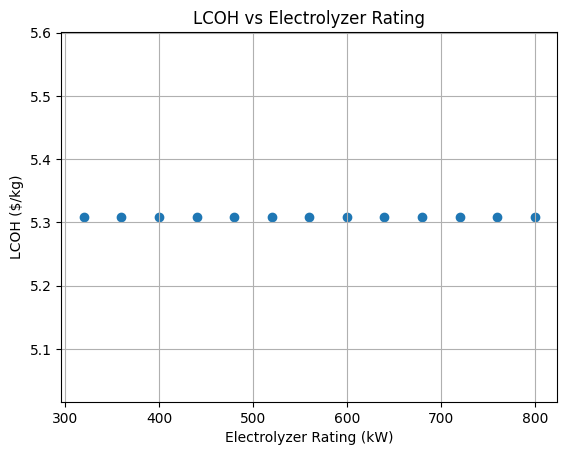
In the example below, we modify the electrolyzer end-of-life efficiency drop and plot the impact on the LCOH.
import numpy as np
import matplotlib.pyplot as plt

# Get the electrolyzer cluster rated capacity
cluster_size_mw = int(
    tech_config["technologies"]["electrolyzer"]["model_inputs"]["performance_parameters"][
        "cluster_rating_MW"
    ]
)

# Define the range for electrolyzer rating
ratings = np.arange(320, 840, cluster_size_mw)

# Initialize arrays to store results
lcoh_results = []

for rating in ratings:
    # Calculate the number of clusters from the rating
    n_clusters = int(rating / cluster_size_mw)

    # Update the number of clusters
    tech_config["technologies"]["electrolyzer"]["model_inputs"]["performance_parameters"][
        "n_clusters"
    ] = n_clusters

    # Rerun the model with the updated configurations
    h2i_model.run()

    # Get the LCOH value
    lcoh = h2i_model.model.get_val("finance_subgroup_hydrogen.LCOH_produced_profast_model", units="USD/kg")[0]

    # Store the results
    lcoh_results.append(lcoh)

# Create a scatter plot
plt.scatter(ratings, lcoh_results)
plt.xlabel("Electrolyzer Rating (kW)")
plt.ylabel("LCOH ($/kg)")
plt.title("LCOH vs Electrolyzer Rating")
plt.grid(True)
plt.show()